Tovo App Page
latest update: 10/12/2018
created: 04/09/2018
Thank you for purchasing my template. If you have any questions that are beyond the scope of this help file, please feel free to Drop Message at Profile Page
How to use
Template Installation
-
FTP Upload:
- Open up your FTP manager and connect to your hosting
- Browse to required directory (Normally public_html)
- Upload the files inside Main folder.
List of pages
Pages
- index.html is For main Home page
- index-style-2.html is For Home page Version 2
- index-style-3.html is For Home page Version 3
- index-style1-color2.html is For Home page Version 1 color style 2
- index-style1-color2.html is For Home page Version 1 color style 3
- index-style-2-color2.html is For Home page Version 2 color style 2
- index-style-2-color3.html is For Home page Version 2 color style 3
- index-style-3-color2.html is For Home page Version 3 color style 2
- index-style-3-color3.html is For Home page Version 3 color style 3
- blog.html is For Blog List
- blog-details.html is For Single Blog details
- blogs-leftside.html is For Blog With left Sidebar
- blogs-rightside.html is For Blog With right Sidebar
- blog-details-with-leftsidebar.html is For Blog details With left Sidebar
- blog-details-with-rightsidebar.html is For Blog details With right Sidebar
- sign-in.html is For login to landng page
- sign-up.html is For login to landng page
- forget-pwd.html is For forget password
- review.html is showing reviews
- 404.html is For showing 404 error not found
- faq.html is For Frequently Asked Questions
- download.html is For Download app
- coming-soon.html is For Coming soon page
- email.html is email templete
Include Fonts
Fonts
Include CSS
Source File (CSS)
Include js
Source File (JS)
Customization
Customization
How to Change Logo

How to Change Copyright

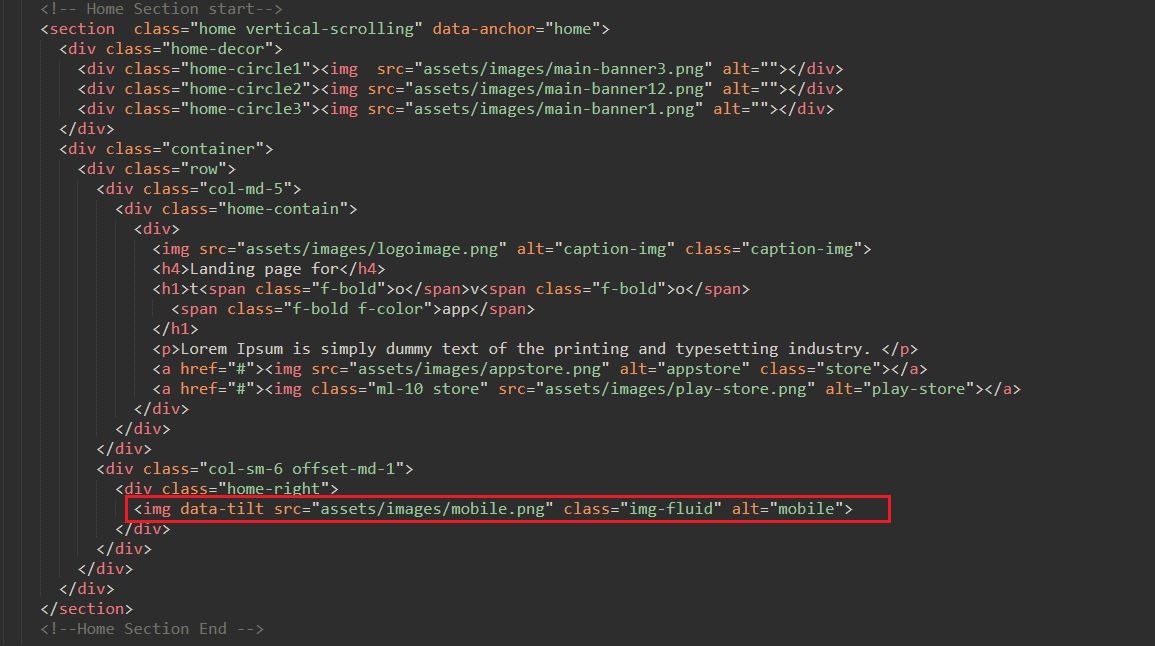
How to Change mobile image on slider
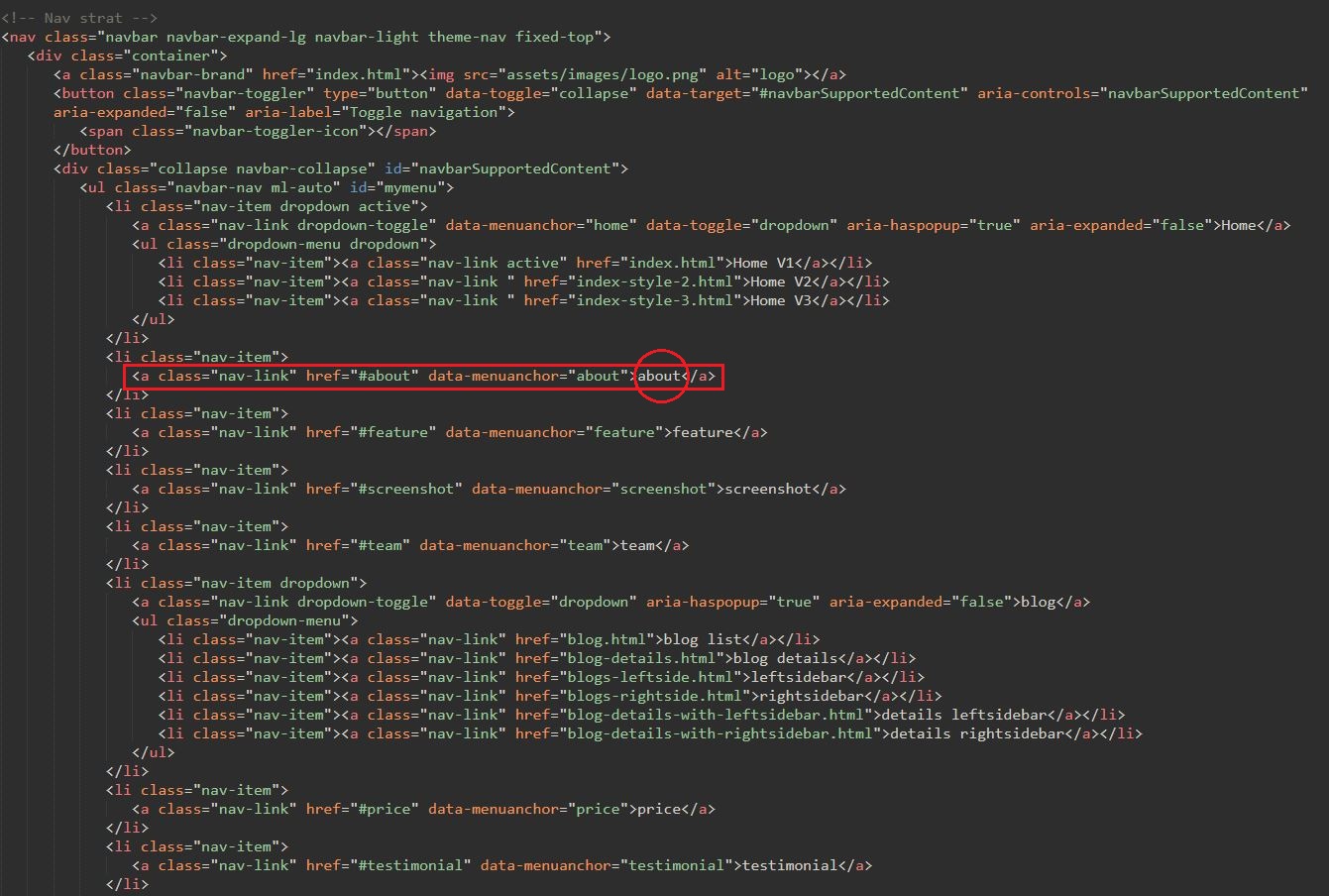
How to add menu and change menu name
How to change color

How to use facebook chat (Update 3.0)
For customized your facbook chat, refer this links which is below:
How to use Mailchimp (Update 3.0)
In form tag use your mailchimp url
<form action="https://pixelstrap.us19.list-manage.com/subscribe/post?u=5a128856334b598b395f1fc9b&id=082f74cbda" class="form-inline subscribe-form auth-form needs-validation" method="post" id="mc-embedded-subscribe-form" name="mc-embedded-subscribe-form" target="_blank">
<div class="form-group mx-sm-3">
<input type="text" class="form-control" name="EMAIL" id="mce-EMAIL" placeholder="Enter your email" required="required">
</div>
<button type="submit" class="btn btn-solid" id="mc-submit">subscribe</button>
</form>
For customized mailchimp , refer this links which is below:
https://mailchimp.com/capture-holiday-traffic/Gulp Tasks(Update 3.1)
Installing Node.js
First, you must download and install node.js. NPM stands for node packaged modules and is a way to manage development dependencies through Node.js.
Download the Node.js source code or a pre-built installer for your platform, and start developing, you can download it from nodejs.org
You can check it in your terminal window using these commands node --version and npm --version.
Installing Gulp
GulpJS is a toolkit for automating painful or time-consuming tasks in your development workflow, so you can stop messing around and build something.
Navigate to the root main/directory,default
Then use
$ npm icommand (install node js)$ gulpcommand (for run project)
NPM use the package.json file and automatically install the required local dependencies listed in it.
dependencies are : gulp, browser-sync, gulp-autoprefixer, gulp-livereload, gulp-pug, gulp-sass, livereload
We have added all necessary gulp task in gulpfile.js, for more details about plugin refer this link https://gulpjs.com/plugins/
How to set live reload path
Your project name"PUG Page Structure(Update 3.1)
Pug Folder Structure
Pug task & how to change output path
pug files are comiled using gulp
The pug task is as per below where we can set output path set from this .pipe(gulp.dest('main/')) statement
gulp.task('pug', function () {
return gulp.src('main/assets/pug/pages/**/*.pug')
.pipe(pug({ pretty: true }))
.on('error', console.error.bind(console))
.pipe(gulp.dest('main/'))
.pipe(bs.reload({stream: true}));
});